In most university subjects Wikipedia is not considered as an appropriate resource for academic purposes. Thus, I was surprised to see how predominantly it is featured in this course (FAHE11001) where it is promoted as an elearning tool. Most academics concern with Wikipedia is associated with the fact that it is a free online encyclopedia that anyone can add to or edit, meaning Wikipedia’s entries don’t undergo a verified expert review and can be flawed in the finer details or otherwise completely fabricated (1).
However, to counter substandard and vandalistic edits, Wikipedia has a variety of systems to catch and control this type of behaviour. These include peer reviews and good article assessment. In addition to this, specific types of articles or fields often have their own specialised and comprehensive projects, assessment processes (such as biographical article assessment), and expert reviewers within specific subjects (2). To give you an idea of how successful these systems are in monitoring the quality of user contributions, I have never seen a wikipedia post that was noticeably fraudulent in its facts, having regularly used the site since grade 8 in high school. I am now 20.
Wikipedia has descriptions and detailed analysis' on just about every field, subject, and/or topic of information in existence. As a resource, wikipedia is a reference point that teachers can use to achieve additional insight into topics they might be covering in their classes. It may assist them in developing more interesting and fact-driven lectures. The material could also be used as a base to construct student handouts. Moreover, because wikipedia is easily accessible through the internet, teachers may choose to direct students to the site to investigate a topic and report on their findings as part of their homework assignment. Thus, as an elearning tool, wikipedia presents itself as an online knowledge base that students and teachers can use to construct a reasonable understanding on a wide variety of subject matter.
References
1) http://www.educause.edu/ELI/7ThingsYouShouldKnowAboutWikip/161666
2) http://en.wikipedia.org/wiki/Wikipedia:About
REFLECTIONS
What are your opinions on wikipedia as a reliable resource?
Friday, November 27, 2009

INCOMPETECH
Incompetech is an online library for royalty-free music where songs are able to be downloaded in both MP3 or WAV format. Since music is often subject to copyright, the site provides users with a free alternative, where music can be used by anyone, for any purpose, provided the composer is credited somewhere or somehow in the users' podcast/slideshow etc.
For students and teachers alike, the site provides a means of "legally" creating more interesting and engaging assignments/presentations. However, considering that most of the music offered through Incompetech is instrumental, it would be best used as background music alongside a visual aid.
I found the site very user-friendly. Once songs are downloaded to your computer's hard-drive they are free to use whenever/however you want. The song I downloaded was called "Rocket". It was an electronica piece and according to the Incompetech site it is described as being a Euro-tech style with some highly processed guitar lines and symphonic elements. Studying marketing myself, I would use this song as an audio feature to compliment a presentation promoting a sport or sporting product because it portrays what I believe to be an athletic vibe.
References
http://incompetech.com/
REFLECTIONS
How important are audio aids in presentations?
For students and teachers alike, the site provides a means of "legally" creating more interesting and engaging assignments/presentations. However, considering that most of the music offered through Incompetech is instrumental, it would be best used as background music alongside a visual aid.
I found the site very user-friendly. Once songs are downloaded to your computer's hard-drive they are free to use whenever/however you want. The song I downloaded was called "Rocket". It was an electronica piece and according to the Incompetech site it is described as being a Euro-tech style with some highly processed guitar lines and symphonic elements. Studying marketing myself, I would use this song as an audio feature to compliment a presentation promoting a sport or sporting product because it portrays what I believe to be an athletic vibe.
References
http://incompetech.com/
REFLECTIONS
How important are audio aids in presentations?
Thursday, November 26, 2009
Webquests
Having not heard the term used before, I found the concept of webquests very interesting as a teaching method. A WebQuest is defined as an inquiry-oriented activity in which some or all of the information that learners interact with comes from resources on the Internet. A well-designed WebQuest combines research-supported theories with effective use of the Internet to promote dependable instructional practices(1).
Learners typically complete WebQuests as cooperative groups. Each learner within a group can be given a "role" or specific area to research. WebQuests may take the form of role-playing scenarios, where students take on the personas of professional researchers or historical figures (2).
A teacher can search for WebQuests on a particular topic or they can develop their own using a web editor. The first part of a WebQuest is the introduction. This describes the WebQuest and gives the purpose of the activity. The next part describes what students will do. Then is a list of what to do and how to do it. There are usually a list of links to follow to complete the activity (2).
While the construction of webquests seems relatively straight-forward, not all products that call themselves "WebQuests" actually meet the minimum requirements and are often research projects masquerading as WebQuests (1).
A good WebQuest uses many of the same principles outlined in the ICT Learning Design framework developed by Professor Ron Oliver which is discussed in a previous blog post. A good webquest should be developed around an authentic context and problem/task. They will ask small teams of students to relate to the messy, ill-structured problem task, investigate the issues, share what individual team members have learned from their individual research and apply this new knowledge to problem and create an authentic product that can then be donated back into the real world for authentic feedback. For their outcome to be successful the teacher must supply students with all the required learning supports and resources as asserted in the ICT Learning Design model (1).
As oppose to traditional models of teaching, webquests are much more successful in engaging students. They encourage students towards a deeper understanding of subject matter by creating involvement and curiosity in the project task and putting them in charge of their own learning experience. They are more engaged in activities by being given ownership of a task and establishing their own unique role within a group and investigating a number of different perspectives on a real-world issue. As group discussion takes place, each student puts forward their opinions and judgments on the subject matter to their fellow team members and this collaborative effort opens students eyes and minds to the real complexity of world issues.
However, constructing a good webquest requires a lot of planning on the teachers part. Thus, the feasibility of this learning approach would require such projects to have a long-term outcome focus. Being that students are fully engaged with course material, webquest should aim at covering a wide body of course curriculum that challenges students on a number of different levels. While this may seem like a lot of work for teachers, the results for students will be a more engaging, productive, and enlightening learning experience.
References
1)March, T 2003 "The Learning Power of WebQuests", Educational Leadership, Vol.61, No.4, pp.42-47, viewed online 27/11/09, http://tommarch.com/writings/wq_power.php
2)http://en.wikipedia.org/wiki/WebQuest
REFLECTIONS
What is your opinion on using role-playing in webquests to engage students? Do you think that webquests that don't use role-playing are as effective as those that do?
Learners typically complete WebQuests as cooperative groups. Each learner within a group can be given a "role" or specific area to research. WebQuests may take the form of role-playing scenarios, where students take on the personas of professional researchers or historical figures (2).
A teacher can search for WebQuests on a particular topic or they can develop their own using a web editor. The first part of a WebQuest is the introduction. This describes the WebQuest and gives the purpose of the activity. The next part describes what students will do. Then is a list of what to do and how to do it. There are usually a list of links to follow to complete the activity (2).
While the construction of webquests seems relatively straight-forward, not all products that call themselves "WebQuests" actually meet the minimum requirements and are often research projects masquerading as WebQuests (1).
A good WebQuest uses many of the same principles outlined in the ICT Learning Design framework developed by Professor Ron Oliver which is discussed in a previous blog post. A good webquest should be developed around an authentic context and problem/task. They will ask small teams of students to relate to the messy, ill-structured problem task, investigate the issues, share what individual team members have learned from their individual research and apply this new knowledge to problem and create an authentic product that can then be donated back into the real world for authentic feedback. For their outcome to be successful the teacher must supply students with all the required learning supports and resources as asserted in the ICT Learning Design model (1).
As oppose to traditional models of teaching, webquests are much more successful in engaging students. They encourage students towards a deeper understanding of subject matter by creating involvement and curiosity in the project task and putting them in charge of their own learning experience. They are more engaged in activities by being given ownership of a task and establishing their own unique role within a group and investigating a number of different perspectives on a real-world issue. As group discussion takes place, each student puts forward their opinions and judgments on the subject matter to their fellow team members and this collaborative effort opens students eyes and minds to the real complexity of world issues.
However, constructing a good webquest requires a lot of planning on the teachers part. Thus, the feasibility of this learning approach would require such projects to have a long-term outcome focus. Being that students are fully engaged with course material, webquest should aim at covering a wide body of course curriculum that challenges students on a number of different levels. While this may seem like a lot of work for teachers, the results for students will be a more engaging, productive, and enlightening learning experience.
References
1)March, T 2003 "The Learning Power of WebQuests", Educational Leadership, Vol.61, No.4, pp.42-47, viewed online 27/11/09, http://tommarch.com/writings/wq_power.php
2)http://en.wikipedia.org/wiki/WebQuest
REFLECTIONS
What is your opinion on using role-playing in webquests to engage students? Do you think that webquests that don't use role-playing are as effective as those that do?
Podcasts
A podcast is a series of digital media files (either audio or video) that are released episodically and downloaded through web syndication (1). Like video, most of the impact of podcasts are achieved in short segments of less than 10 minutes (2).
The visual, and quick, straight to the point nature of podcasts appeals most to today's students. They like information that projects meaning instantaneously and they prefer the visual nature of this technology more than reading through several pages of text.
For these reasons podcasts are used widely in educational settings. They offer a range of benefits for both students and teachers. They offer students the opportunity to listen some of the best educators in the world, on a range of topics from the comfort of their own home. Moreover, if a student accidentally misses a class, they can catch up on what has been covered if the lesson is recorded and published as a podcast.
For teachers the benefits are similar. By recording and publishing their lessons, students do not have to be physically present in a classroom to learn. For the education industry this means that less teachers may be required to "teach" a class. Furthermore, teachers maybe able to use the podcasts, already available through special client software applications such as itunes, as a supplementary teaching aid.
References
1)http://en.wikipedia.org/wiki/Podcast
2)Podcasting, online http://moodle.cqu.edu.au/mod/resource/view.php?id=18307
REFLECTIONS
Do you think elearning tools such as podcasts, which have improved the methods of teaching used in flexible learning environments, will have an impact on reducing the number of teachers required in the education industry? What is your thoughts on this?
The visual, and quick, straight to the point nature of podcasts appeals most to today's students. They like information that projects meaning instantaneously and they prefer the visual nature of this technology more than reading through several pages of text.
For these reasons podcasts are used widely in educational settings. They offer a range of benefits for both students and teachers. They offer students the opportunity to listen some of the best educators in the world, on a range of topics from the comfort of their own home. Moreover, if a student accidentally misses a class, they can catch up on what has been covered if the lesson is recorded and published as a podcast.
For teachers the benefits are similar. By recording and publishing their lessons, students do not have to be physically present in a classroom to learn. For the education industry this means that less teachers may be required to "teach" a class. Furthermore, teachers maybe able to use the podcasts, already available through special client software applications such as itunes, as a supplementary teaching aid.
References
1)http://en.wikipedia.org/wiki/Podcast
2)Podcasting, online http://moodle.cqu.edu.au/mod/resource/view.php?id=18307
REFLECTIONS
Do you think elearning tools such as podcasts, which have improved the methods of teaching used in flexible learning environments, will have an impact on reducing the number of teachers required in the education industry? What is your thoughts on this?
MediaFire
MediaFire is a free file and image hosting web site. Once a file is uploaded users can use the software to link their files to a Website (Blog or WIKI) and make it available for anyone to download, including students (1).
The benefits of using this software in learning contexts is that students are able to access new learning material that their teachers' prescribe in one location from the comfort of their own home, anytime they want. This is a particularly useful tool when distance learning is involved.
The following link will direct you to the files that I have made publicly accessible through mediafire. It includes a list of song files that I am listening to at the moment.
http://www.mediafire.com/?sharekey=991d3151fdc6c86fd9d5c56d04dfa8b0ab8e953fc3d2043ca7b01fe6e4055ae3
References
1)File Storage, http://moodle.cqu.edu.au/mod/resource/view.php?id=18307
The benefits of using this software in learning contexts is that students are able to access new learning material that their teachers' prescribe in one location from the comfort of their own home, anytime they want. This is a particularly useful tool when distance learning is involved.
The following link will direct you to the files that I have made publicly accessible through mediafire. It includes a list of song files that I am listening to at the moment.
http://www.mediafire.com/?sharekey=991d3151fdc6c86fd9d5c56d04dfa8b0ab8e953fc3d2043ca7b01fe6e4055ae3
References
1)File Storage, http://moodle.cqu.edu.au/mod/resource/view.php?id=18307
Voicethread
VoiceThread is a powerful critiquing technology that allows you and your students to make a range of comment types (text, drawing, voice, file upload, & video) to a video or image (1).
I found the technology extremely user-friendly. The threads were easy to create and comments were simple to add. The following link will direct you to the short video log I created. It identifies what I believe to be the top 5 most iconic Australian brands. I invite you to share your comments.
http://voicethread.com/share/767441/
As an elearning tool VoiceThread facilitates collaboration between students and teachers by allowing users to add their comments to photos. As an example of how it may be used in the classroom, teachers could use VoiceThread to create a slideshow using a mixture of images and videos on a particular topic they a covering in class. Students could then place their comments on each slide and collaborate with other students to form a deeper understanding of the subject matter. It is this interaction that enhances students' learning experience by promoting discussion.
References
1)VoiceThread, online http://moodle.cqu.edu.au/mod/resource/view.php?id=18307
REFLECTIONS
How important do you believe collaboration with other students is in facilitating the learning process.
I found the technology extremely user-friendly. The threads were easy to create and comments were simple to add. The following link will direct you to the short video log I created. It identifies what I believe to be the top 5 most iconic Australian brands. I invite you to share your comments.
http://voicethread.com/share/767441/
As an elearning tool VoiceThread facilitates collaboration between students and teachers by allowing users to add their comments to photos. As an example of how it may be used in the classroom, teachers could use VoiceThread to create a slideshow using a mixture of images and videos on a particular topic they a covering in class. Students could then place their comments on each slide and collaborate with other students to form a deeper understanding of the subject matter. It is this interaction that enhances students' learning experience by promoting discussion.
References
1)VoiceThread, online http://moodle.cqu.edu.au/mod/resource/view.php?id=18307
REFLECTIONS
How important do you believe collaboration with other students is in facilitating the learning process.
Wednesday, November 25, 2009
SlideShare
Check out this SlideShare Presentation I created:
Slideshare allows you to upload powerpoint and openoffice files to a publicly viewable space. Audio files can also be uploaded which are then sychronised with the slides of the presentation. The presentation then becomes a video file that can be embedded in any online product including, blogs, WIKIs etc (1).
The technology allows users to re-use presentations that would normally be delivered only once, saving significant amounts of time and effort. Moreover, because presentations are published over the Internet, viewers can watch posts from anywhere in the world, at anytime they want (1).
I found the software very user-friendly. Once a powerpoint is created the uploading process is fairly straight-forward. However, I did encounter some problems uploading the audio file. After converting the audio from a wma to an mp3 file the program would not allow me to publish it meaning I was unable to synchronise my presentation as I had hoped. This was a little disappointing.
In learning contexts, slideshare presents itself as a great elearning tool. Like many of the other elearning tools discussed its greatest advantage is an outcome of its provision as a format where greater connectivity between teachers and students can take place. Through the internet it facilitates learning that is able to occur outside of school hours and environments. As a result, students can also tailor their own learning experience which allows them to study at their own pace, concentrating on specific areas of interest.
References
1)Slideshare, http://moodle.cqu.edu.au/mod/resource/view.php?id=18307
Australia
View more presentations from lynealet.
Slideshare allows you to upload powerpoint and openoffice files to a publicly viewable space. Audio files can also be uploaded which are then sychronised with the slides of the presentation. The presentation then becomes a video file that can be embedded in any online product including, blogs, WIKIs etc (1).
The technology allows users to re-use presentations that would normally be delivered only once, saving significant amounts of time and effort. Moreover, because presentations are published over the Internet, viewers can watch posts from anywhere in the world, at anytime they want (1).
I found the software very user-friendly. Once a powerpoint is created the uploading process is fairly straight-forward. However, I did encounter some problems uploading the audio file. After converting the audio from a wma to an mp3 file the program would not allow me to publish it meaning I was unable to synchronise my presentation as I had hoped. This was a little disappointing.
In learning contexts, slideshare presents itself as a great elearning tool. Like many of the other elearning tools discussed its greatest advantage is an outcome of its provision as a format where greater connectivity between teachers and students can take place. Through the internet it facilitates learning that is able to occur outside of school hours and environments. As a result, students can also tailor their own learning experience which allows them to study at their own pace, concentrating on specific areas of interest.
References
1)Slideshare, http://moodle.cqu.edu.au/mod/resource/view.php?id=18307
Google Earth
After downloading Google Earth I am only now beginning to realise the full extent of its potential as an e-learning tool. As a technology it displays satellite images of varying resolution of the Earth's surface, allowing users to explore various landmarks and cities from a number of different angles using 3D imagery. The degree of resolution available is based somewhat on the points of interest and popularity, but most land (except for some islands) is covered in at least 15 meters of resolution (1).
For students, Google Earth allows students to explore not only the world, but mars, the moon, and the stars and other celestial bodies through sky view (1). Students can also go back in history and explore the past to see how locations have changed over time. Furthermore, through collaborations with wikipedia, youtube, the national geographic magazine and panaramio students can access interesting information, statistics, videos, and images regarding various locations and landmarks.
In learning contexts, the possibilities enabled through this technology are endless especially in the fields of history, social studies, and geography. While I remember using atlases and books to research these topics in my primary school years, students now have some of the most up-to-date images and data available regarding world issues at their fingertips. While the satellite images do not use real-time imagery at this point in time, I have no doubt that in the future we will see this eventuate as technology continues to become more advanced. For now however, Google Earth remains an extraordinary e-learning tool. Students can travel the world free of charge eliminating the need and/or reducing the disadvantage for students who cannot afford to travel with their schools on expensive field trips.
References
1)http://en.wikipedia.org/wiki/Google_Earth
REFLECTIONS
In your opinion, how would exploring a location through Google Earth facilitate an enhanced learning experience for students?
For students, Google Earth allows students to explore not only the world, but mars, the moon, and the stars and other celestial bodies through sky view (1). Students can also go back in history and explore the past to see how locations have changed over time. Furthermore, through collaborations with wikipedia, youtube, the national geographic magazine and panaramio students can access interesting information, statistics, videos, and images regarding various locations and landmarks.
In learning contexts, the possibilities enabled through this technology are endless especially in the fields of history, social studies, and geography. While I remember using atlases and books to research these topics in my primary school years, students now have some of the most up-to-date images and data available regarding world issues at their fingertips. While the satellite images do not use real-time imagery at this point in time, I have no doubt that in the future we will see this eventuate as technology continues to become more advanced. For now however, Google Earth remains an extraordinary e-learning tool. Students can travel the world free of charge eliminating the need and/or reducing the disadvantage for students who cannot afford to travel with their schools on expensive field trips.
References
1)http://en.wikipedia.org/wiki/Google_Earth
REFLECTIONS
In your opinion, how would exploring a location through Google Earth facilitate an enhanced learning experience for students?
Multiple Choice Quizzes
Multiple Choice Quizzes (MCQs) offer a number of advantages for teachers. This includes the ability to make previously paper-based quizzes available and automatically marked on the Web as well as providing students with a forum to practice and test their knowledge and understanding of course content. Furthermore, students are able to practice online quizzes from any location, anytime of the days, whenever they like (1).
Through ClassMarker teachers are able to create MCQs free of charge. Students can register through a class to complete the assigned tests. The software is relatively straight-forward to use and offers a number of features including multiple choice, multiple response, true/false, punctuation, or essay questions. Teachers can also assign time limits in which tests must be completed, they can choose how correct answers will be displayed, and determine a relative passing grade for the test, among other things. The link below will direct you to a MCQ I created using the ClassMarker software and gives you a relative idea of the type of learning experience students can achieve through the use of this technology.
http://www.classmarker.com/quiz/intro.php?test_id=78714
I believe that this software provides students with a more interactive experience with course content. By taking advantage of MCQs teachers are able to track students' progress through automatic feedback of their results. They can then determine areas for improvement of individual students and tailor a learning experience specifically to them.
References
1)Quizzes, online http://moodle.cqu.edu.au/mod/resource/view.php?id=18307
Trivia questions sourced from:
http://www.australiaday.org.au/pages/images/Australian%20Trivia%20-%20QandAs.pdf
REFLECTIONS
MCQs promote open-book learning environments. What are your opinions of open-book testing and what is its place in educational settings?
Through ClassMarker teachers are able to create MCQs free of charge. Students can register through a class to complete the assigned tests. The software is relatively straight-forward to use and offers a number of features including multiple choice, multiple response, true/false, punctuation, or essay questions. Teachers can also assign time limits in which tests must be completed, they can choose how correct answers will be displayed, and determine a relative passing grade for the test, among other things. The link below will direct you to a MCQ I created using the ClassMarker software and gives you a relative idea of the type of learning experience students can achieve through the use of this technology.
http://www.classmarker.com/quiz/intro.php?test_id=78714
I believe that this software provides students with a more interactive experience with course content. By taking advantage of MCQs teachers are able to track students' progress through automatic feedback of their results. They can then determine areas for improvement of individual students and tailor a learning experience specifically to them.
References
1)Quizzes, online http://moodle.cqu.edu.au/mod/resource/view.php?id=18307
Trivia questions sourced from:
http://www.australiaday.org.au/pages/images/Australian%20Trivia%20-%20QandAs.pdf
REFLECTIONS
MCQs promote open-book learning environments. What are your opinions of open-book testing and what is its place in educational settings?
Mahara
Mahara is an open source ePortfolio and social networking web application. It provides users with tools to create and maintain a digital portfolio of their learning, and social networking features which allow them to interact with each other. Users can take advantage of mahara tools such as blog building capabilities, a resume builder, a file manager and a view creator - a tool to help users create arrangements of their content in a particular way for others to see (1).
Having used the program as part of the FAHE11001 course I can see its potential in learning contexts. It allows students share their their learning experiences with other students by uploading their files to their online profile. They can collaborate with their classmates through the blog function, and the software even provides a tool for students that allows them to construct their online profile and build their personal resume.
For students this tool provides enormous opportunity in terms of developing their own learning experience. The collaborative nature of the online forum encourages students towards developing a deeper understanding of course content and the ability to add new content at any time allows students to engage in a continuous learning journey.
References
http://en.wikipedia.org/wiki/Mahara
REFLECTIONS
What do you think is the greatest feature of the Mahara software? How will you use this in your learning journey?
Having used the program as part of the FAHE11001 course I can see its potential in learning contexts. It allows students share their their learning experiences with other students by uploading their files to their online profile. They can collaborate with their classmates through the blog function, and the software even provides a tool for students that allows them to construct their online profile and build their personal resume.
For students this tool provides enormous opportunity in terms of developing their own learning experience. The collaborative nature of the online forum encourages students towards developing a deeper understanding of course content and the ability to add new content at any time allows students to engage in a continuous learning journey.
References
http://en.wikipedia.org/wiki/Mahara
REFLECTIONS
What do you think is the greatest feature of the Mahara software? How will you use this in your learning journey?
RSS Aggregator
RSS (Really Simple Syndication) Aggregators are a web application which aggregate syndicated web content such as news headlines, blogs, podcasts, and vlogs in a single location for easy viewing. Aggregators reduce the time and effort needed to regularly check websites for updates by creating a unique information space where all updates are displayed. Once subscribed to a feed, an aggregator is able to check for new content at user-determined intervals and retrieve the update (1).
Having to monitor all the blog posts of my fellow classmates as part of this assignment I found Google Reader extremely helpful in allowing me to better manage who and how I reply to blog posts. Since registering with Google Reader I have also subscribed to CNN news feed which allows me to keep informed on all the latest news content from around the world.
In learning contexts using a RSS aggregator will ensure students are able to monitor and schedule their learning experiences appropriately. This is especially important for students who are using podcasts and blog posts regularly as part of their learning tasks. The use of an RSS aggregator will ensure students are studying the most up-to-date material.
References
1)http://en.wikipedia.org/wiki/Aggregator
REFLECTIONS
How will an RSS aggregator improve students time management skills? Do you think this will have an impact on how they manage their time in non-technological circumstances?
Having to monitor all the blog posts of my fellow classmates as part of this assignment I found Google Reader extremely helpful in allowing me to better manage who and how I reply to blog posts. Since registering with Google Reader I have also subscribed to CNN news feed which allows me to keep informed on all the latest news content from around the world.
In learning contexts using a RSS aggregator will ensure students are able to monitor and schedule their learning experiences appropriately. This is especially important for students who are using podcasts and blog posts regularly as part of their learning tasks. The use of an RSS aggregator will ensure students are studying the most up-to-date material.
References
1)http://en.wikipedia.org/wiki/Aggregator
REFLECTIONS
How will an RSS aggregator improve students time management skills? Do you think this will have an impact on how they manage their time in non-technological circumstances?
Tuesday, November 24, 2009
Flickr

Flickr is an image and video hosting website, web services suite, and online community platform. In addition to being a popular website for users to share personal photographs, the service is widely used by bloggers as a photo repository. It allows users a place to store their photos, tag them and share them with others either through a link to the site or by embedding them in their personal blog or web page. There are all types of photos available on Flickr, from simple home photos to creative works of art. The one above is an example of what I have found (1).
The difference between Flickr and other image software tools is connectivity. With both private and public image storage, anyone with adequate access can view users photos and in learning environments it is easy to share these images/powerpoint presentations with students (1). Moreover, through the internet students have the ability to view them in their own personal time outside school hours.The only problem with this is that some schools have blocked access to this site which means this powerful e-learning tool is out of reach for some students.
References
1) http://en.wikipedia.org/wiki/Flickr
REFLECTIONS
What are your thoughts of Flickr as an e-learning tool? How would you use it?
Picnik

Picnik is an online photo editing service. Many of Picnik's basic photo editing tools are free to use however, a premium version of Picnik is available at a cost which includes additional photo editing features (1).
Using the basic version I had a very enjoyable and enlightening experience with the software. Not knowing that the technology existed I will definitely use it again in the future when I need to crop, frame, or add some special effects to my images as I have done in the above photo I obtained off the Flickr website originally.
In learning contexts, Picnik offers students a great tool for enhancing the visual appeal of images for class projects. Moreover, it is a great way of reducing the physical size of images so that they display quickly and are the right size for a page.
References
1) http://en.wikipedia.org/wiki/Picnik
REFLECTIONS
How might students react to the Picnik software? Do you think that they will waste more time "playing around" with this software than the benefits they achieve by using it?
Monday, November 23, 2009
Wikis
A wiki is a website that allows for the easy creation and editing of any number of interlinked web pages via a web browser. Wikis are are often used to create collaborative websites, to power community websites, for personal note taking, in corporate intranets, and in knowledge management systems (1).
Most wikis serve a specific purpose, and off topic material is promptly removed by the user community (1). They allow for the coordination and organisation of group input. Unlike traditional email where information is scattered across multiple users' inboxes, Wikis provide users with one location where they can access and edit information. This is much easier than managing multiple replies and responses (2).
In learning contexts, Wikis allow students to construct projects and assignments in manner that makes location almost insignificant. Students can make adjustments to eachothers work easily. Moreover, this technology is seen as a convenient alternative to other ICT's which assist individuals working in team-based projects.
References
1)http://en.wikipedia.org/wiki/Wiki
2)Wikis in Plain English, online http://moodle.cqu.edu.au/mod/resource/view.php?id=18307
REFLECTIONS
What impact will the advent of Wiki's have on email? Have you ever used Wikis for group work and/or will you in the future?
Most wikis serve a specific purpose, and off topic material is promptly removed by the user community (1). They allow for the coordination and organisation of group input. Unlike traditional email where information is scattered across multiple users' inboxes, Wikis provide users with one location where they can access and edit information. This is much easier than managing multiple replies and responses (2).
In learning contexts, Wikis allow students to construct projects and assignments in manner that makes location almost insignificant. Students can make adjustments to eachothers work easily. Moreover, this technology is seen as a convenient alternative to other ICT's which assist individuals working in team-based projects.
References
1)http://en.wikipedia.org/wiki/Wiki
2)Wikis in Plain English, online http://moodle.cqu.edu.au/mod/resource/view.php?id=18307
REFLECTIONS
What impact will the advent of Wiki's have on email? Have you ever used Wikis for group work and/or will you in the future?
Sunday, November 22, 2009
Powerpoint
I've used powerpoint throughout my entire schooling life. It is a software used for the creation of slide shows and presentations (1). For the visual learner it is a great elearning tool that can be used to engage students as a background visual for oral presentations. It can also be used as an entire learning experience when text and/or sound is incorporated into the slide show.
Given my interaction with the program in the past I am pretty confident in using it. I can use animation and timing elements to make the same slide seem interesting for longer and consider the use of powerpoints as critical to engaging an audience in oral presentations. For teachers, powerpoints are increasingly utilised now as more and more schools implement interactive whiteboards in the classroom. Given documented accounts of improved student engagement, I believe teachers should incorporate powerpoints into lessons where the topic may take a longer time to cover than usual to ensure students can maintain their attention with the topic for a longer period of time.
References
1)http://c4lpt.co.uk/Top100Tools/powerpoint.html
REFLECTIONS
What are your experiences with powerpoint? What is its place in learning contexts?
Given my interaction with the program in the past I am pretty confident in using it. I can use animation and timing elements to make the same slide seem interesting for longer and consider the use of powerpoints as critical to engaging an audience in oral presentations. For teachers, powerpoints are increasingly utilised now as more and more schools implement interactive whiteboards in the classroom. Given documented accounts of improved student engagement, I believe teachers should incorporate powerpoints into lessons where the topic may take a longer time to cover than usual to ensure students can maintain their attention with the topic for a longer period of time.
References
1)http://c4lpt.co.uk/Top100Tools/powerpoint.html
REFLECTIONS
What are your experiences with powerpoint? What is its place in learning contexts?
Avatars
Avatars are used throughout the managing e-learning course. They are used to introduce the content that will be covered in weekly modules. Avatars appeal to the visual learners who find it difficult to engage with written material and they can be used to provide speach for students with poor reading skills. They are suited to digital natives who prefer interactivity and are competent working with ICT's (1).
In my personal opinion, I think avatars are most effective when used as an introductory tool similar to how they are employed in our course. This is because students can become disengaged with them if the message is too long as their visual appeal is somewhat limited compared to videos.
References
1)Voki Avatars, online http://moodle.cqu.edu.au/mod/resource/view.php?id=18307
REFLECTIONS
What is your opinion of using avatars in learning contexts given your experience with them?
YouTube
YouTube is a resource site where you can host, tag and share videos. If you want to use a video, you can either link to it on the YouTube site or embed it into a web page or blog. It is therefore a useful resource of user-generated video content (1).
In learning contexts YouTube is a valuable resource that provides students with the ability to listen and learn from some of the best educators in the world from the comfort of their desktop computer. This learning can take place anywhere and at anytime, both at home and at school.
Having upgraded from dial-up to broadband internet in the past year I increasingly find myself turning to YouTube as a source of information to reaffirm my findings and/or increase my knowledge on certain topics. As a visual learner I am better engaged using videos for learning rather than reading through pages and pages of information.
There is also endless potential for teachers who choose to use YouTube as a teaching aid. I sourced the following video from YouTube which focuses on the topic of cyber bullying. The video is humourous and short and I feel that it would appeal to today's students because the message is established fairly quickly and the video is visually appealing and professionally developed. I would use this particular video as an introductory feature to spark discussion on the issue of cyber bullying and what students think the major differences are between cyber bullying and non-cyber bullying
References
1)http://en.wikipedia.org/wiki/YouTube
REFLECTIONS
Have you ever used YouTube for learning? How? and would you recommend it?
In learning contexts YouTube is a valuable resource that provides students with the ability to listen and learn from some of the best educators in the world from the comfort of their desktop computer. This learning can take place anywhere and at anytime, both at home and at school.
Having upgraded from dial-up to broadband internet in the past year I increasingly find myself turning to YouTube as a source of information to reaffirm my findings and/or increase my knowledge on certain topics. As a visual learner I am better engaged using videos for learning rather than reading through pages and pages of information.
There is also endless potential for teachers who choose to use YouTube as a teaching aid. I sourced the following video from YouTube which focuses on the topic of cyber bullying. The video is humourous and short and I feel that it would appeal to today's students because the message is established fairly quickly and the video is visually appealing and professionally developed. I would use this particular video as an introductory feature to spark discussion on the issue of cyber bullying and what students think the major differences are between cyber bullying and non-cyber bullying
References
1)http://en.wikipedia.org/wiki/YouTube
REFLECTIONS
Have you ever used YouTube for learning? How? and would you recommend it?
Moodle
Moodle is an open source learning management system (LMS) that is taking the educational world by storm (1). This term I've noticed many of my courses at CQUniversity have switched from proprietary LMS's such as blackboard academic suite to this system. Having not used it before, I found it to be fairly user-friendly and I predict that it will probably become the preferred platform for online courses at CQU.
I believe Moodle has been created with the digital native in mind. It is constructed using a social-networking framework, allowing students to construct their own profiles and promoting collaboration more so than many other learning management systems I have used. Its only downfall, in my opinion, aside from the noted lack of documentation and backup support is that it needs a better layout. A sidebar like that used in the blackboard LMS where topics and course information can be easily accessed in one spot (and not all over the place) would increase its user-friendliness.
References
Learning Management Systems (LMS), online http://moodle.cqu.edu.au/mod/resource/view.php?id=18307
REFECTIONS
What are your impressions of moodle?
I believe Moodle has been created with the digital native in mind. It is constructed using a social-networking framework, allowing students to construct their own profiles and promoting collaboration more so than many other learning management systems I have used. Its only downfall, in my opinion, aside from the noted lack of documentation and backup support is that it needs a better layout. A sidebar like that used in the blackboard LMS where topics and course information can be easily accessed in one spot (and not all over the place) would increase its user-friendliness.
References
Learning Management Systems (LMS), online http://moodle.cqu.edu.au/mod/resource/view.php?id=18307
REFECTIONS
What are your impressions of moodle?
Tools of the Trade
Hi all
I've spent a lot of time on this blog discussing the various concepts we've learnt throughout this subject to satisfy the course requirements. Now I'd like to investigate further into the various e-learning tools available to teachers which can assist them in making their lessons more engaging and applicable to today's students.
The following site lists the top 100 e-learning tools of 2009. In future blogs I hope to discuss some of these in more depth.
http://c4lpt.co.uk/recommended/
I think it is interesting to see that Twitter is voted as the top e-learning tool for 2009 when I consider this to be for primarily social use. It is a real eye-opener to consider the various possibilities and uses of these tools and how they can be adapted for learning contexts.
Cheers
Lyneale
I've spent a lot of time on this blog discussing the various concepts we've learnt throughout this subject to satisfy the course requirements. Now I'd like to investigate further into the various e-learning tools available to teachers which can assist them in making their lessons more engaging and applicable to today's students.
The following site lists the top 100 e-learning tools of 2009. In future blogs I hope to discuss some of these in more depth.
http://c4lpt.co.uk/recommended/
I think it is interesting to see that Twitter is voted as the top e-learning tool for 2009 when I consider this to be for primarily social use. It is a real eye-opener to consider the various possibilities and uses of these tools and how they can be adapted for learning contexts.
Cheers
Lyneale
Monday, November 16, 2009
Digital Natives vs Digital Immigrants
In this course we explore the technological competencies required within a 21st century connected society. It is widely accepted that the internet has transformed the learning styles of modern students. As a result, today’s students think and process information fundamentally differently from their predecessors (1).
The differences between these generational cohorts and their experiences with technology has been explained by categorising them into one of two groups; digital natives or digital immigrants ie: those who have grown up with technology and those who have not, respectively (1).
Digital natives are accustomed to receiving information fast. They like to parallel process and multi-task. They function best when networked and thrive on instant gratification and frequent rewards, preferring games to “serious” work. On the other hand, Digital Immigrants typically have very little appreciation for the skills Natives have acquired and perfected through years of interaction and practice. These skills are almost totally foreign to the Immigrants, who themselves learned – and so choose to teach – slowly, step-by-step, one thing at a time, individually, and above all, seriously (1).
The problem that arises in modern educational institutions for the digital native is that they are often being taught by the teaching styles preferred by digital immigrants and the collaboration of these teaching and learning styles rarely corresponds. Consequently, today’s teachers must learn to communicate in a language and style that relates to their students. This doesn’t mean changing the meaning of what is important, rather adapting their current teaching methodologies by moving through content at a faster pace which is less step-by step, and more parallel (1).
The following video explains one student's vision of how educational institutions need to progress into the future to better reach students through the potential technology can offer. I tend to agree with her views, especially as social and business contexts become increasingly more geared towards digital natives.
References
1)Prensky, M 2001 Digital Natives, Digital Immigrants, viewed online 16/11/09, http://www.marcprensky.com/writing/Prensky%20-%20Digital%20Natives,%20Digital%20Immigrants%20-%20Part1.pdf
REFLECTIONS
Do you think it is necessary for educational institutions to adapt their teaching styles to suit the preferred learning styles of digital natives? and, Do you think the old ways of learning still important?
The differences between these generational cohorts and their experiences with technology has been explained by categorising them into one of two groups; digital natives or digital immigrants ie: those who have grown up with technology and those who have not, respectively (1).
Digital natives are accustomed to receiving information fast. They like to parallel process and multi-task. They function best when networked and thrive on instant gratification and frequent rewards, preferring games to “serious” work. On the other hand, Digital Immigrants typically have very little appreciation for the skills Natives have acquired and perfected through years of interaction and practice. These skills are almost totally foreign to the Immigrants, who themselves learned – and so choose to teach – slowly, step-by-step, one thing at a time, individually, and above all, seriously (1).
The problem that arises in modern educational institutions for the digital native is that they are often being taught by the teaching styles preferred by digital immigrants and the collaboration of these teaching and learning styles rarely corresponds. Consequently, today’s teachers must learn to communicate in a language and style that relates to their students. This doesn’t mean changing the meaning of what is important, rather adapting their current teaching methodologies by moving through content at a faster pace which is less step-by step, and more parallel (1).
The following video explains one student's vision of how educational institutions need to progress into the future to better reach students through the potential technology can offer. I tend to agree with her views, especially as social and business contexts become increasingly more geared towards digital natives.
References
1)Prensky, M 2001 Digital Natives, Digital Immigrants, viewed online 16/11/09, http://www.marcprensky.com/writing/Prensky%20-%20Digital%20Natives,%20Digital%20Immigrants%20-%20Part1.pdf
REFLECTIONS
Do you think it is necessary for educational institutions to adapt their teaching styles to suit the preferred learning styles of digital natives? and, Do you think the old ways of learning still important?
Sunday, November 15, 2009
The Learning Theory
An important concept we investigated during this course is the learning theory. It tries to explain how learning occurs suggesting that the concept of learning falls into three general categories: behaviourism, cognitive and constructivism (1).
Behaviourism suggests learning is the acquisition of new behaviour through conditioning. The theory rests on three basic assumptions. First, learning is manifested by a change in behaviour. Second, the environment shapes behaviour. And third, the principles of reinforcement are central to explaining the learning process (2).
Cognitivists understand learning in terms of mental processing. The theory is built on two key assumptions which underlie this cognitive approach: 1 - that the memory system is an active organised processor of information and 2 - that prior knowledge plays an important role in learning. Cognitive theories look beyond behaviour to explain brain-based learning by considering how human memory works to promote learning (3).
Constructivists believe that learners construct their own reality or at least interpret it based upon their perceptions of experiences, so an individual's knowledge is a function of one's prior experiences, mental structures, and beliefs that are used to interpret objects and events. The teacher acts as a facilitator who encourages students to discover principles for themselves and to construct knowledge by working to solve realistic problems (1).
A more contemporary approach to these learning theories developed by George Siemens is Connectivism. Based on his analysis of the limitations of behaviourism, cognitivism and constructivism in today's current environment, Connectivism is a learning theory developed for the digital age. The approach defines learning in terms of the effect technology has had on the way we live, how we communicate, and how we learn. A key premise of the theory is that technology gives us the ability to connect specialised information sets and these connections can be used to build knowledge (4).
In learning contexts, each theory offers teachers different approaches to how they should construct their teaching methods based on the different perspectives of learning. For example, those who teach using the principles of behaviourism might use reinforcement to promote learning through repetition while those teaching under the connectivism approach might utilise the communication facilities offered through the use of ICT's such as the internet to build students' knowledge networks. In this respect, the type of learning theory educators assume to be true will, in turn, influence their teaching styles and therefore affect students' learning outcomes.
Considering the characteristics of modern students and their preferred learning experiences in today's educational institutions I would probably be inclined towards developing lessons using a connectivism approach to learning. However, as a learning manager I believe it is important to understand the implications that constructing educational scenarios using the principles of any one single approach may have on segregating group learning styles and privileging some students above others.
References
1)A brief overview of the Learning Theory, online http://moodle.cqu.edu.au/mod/resource/view.php?id=18262
2)http://www.stanford.edu/dept/SUSE/projects/ireport/articles/general/Educational%20Theories%20Summary.pdf
3)http://nechodimnaprednasky.sk/prednaska_nahlad/4783
4)http://en.wikipedia.org/wiki/Educational_technology
REFLECTIONS
Which learning theory do you perceive as being the most accurate in terms of explaining how learning occurs? Why?
Behaviourism suggests learning is the acquisition of new behaviour through conditioning. The theory rests on three basic assumptions. First, learning is manifested by a change in behaviour. Second, the environment shapes behaviour. And third, the principles of reinforcement are central to explaining the learning process (2).
Cognitivists understand learning in terms of mental processing. The theory is built on two key assumptions which underlie this cognitive approach: 1 - that the memory system is an active organised processor of information and 2 - that prior knowledge plays an important role in learning. Cognitive theories look beyond behaviour to explain brain-based learning by considering how human memory works to promote learning (3).
Constructivists believe that learners construct their own reality or at least interpret it based upon their perceptions of experiences, so an individual's knowledge is a function of one's prior experiences, mental structures, and beliefs that are used to interpret objects and events. The teacher acts as a facilitator who encourages students to discover principles for themselves and to construct knowledge by working to solve realistic problems (1).
A more contemporary approach to these learning theories developed by George Siemens is Connectivism. Based on his analysis of the limitations of behaviourism, cognitivism and constructivism in today's current environment, Connectivism is a learning theory developed for the digital age. The approach defines learning in terms of the effect technology has had on the way we live, how we communicate, and how we learn. A key premise of the theory is that technology gives us the ability to connect specialised information sets and these connections can be used to build knowledge (4).
In learning contexts, each theory offers teachers different approaches to how they should construct their teaching methods based on the different perspectives of learning. For example, those who teach using the principles of behaviourism might use reinforcement to promote learning through repetition while those teaching under the connectivism approach might utilise the communication facilities offered through the use of ICT's such as the internet to build students' knowledge networks. In this respect, the type of learning theory educators assume to be true will, in turn, influence their teaching styles and therefore affect students' learning outcomes.
Considering the characteristics of modern students and their preferred learning experiences in today's educational institutions I would probably be inclined towards developing lessons using a connectivism approach to learning. However, as a learning manager I believe it is important to understand the implications that constructing educational scenarios using the principles of any one single approach may have on segregating group learning styles and privileging some students above others.
References
1)A brief overview of the Learning Theory, online http://moodle.cqu.edu.au/mod/resource/view.php?id=18262
2)http://www.stanford.edu/dept/SUSE/projects/ireport/articles/general/Educational%20Theories%20Summary.pdf
3)http://nechodimnaprednasky.sk/prednaska_nahlad/4783
4)http://en.wikipedia.org/wiki/Educational_technology
REFLECTIONS
Which learning theory do you perceive as being the most accurate in terms of explaining how learning occurs? Why?
Mazlow's Heirarchy of Needs
Mazlow’s hierarchy of needs, created by Abraham Mazlow in the 1970’s suggested that there was a hierarchy of needs that needed to be met before effective learning could occur. He represented this in terms of the pyramid below. He concluded that lower level needs needed to be satisfied before the upper levels can be achieved and effective learning could take place (1).

It is the responsibility of learning institutions to provide these basic provisions to students. This includes basic physiological, safety and belonging needs. Once these needs are met it is assumed that students will be equipped to go on to achieve high order needs such as esteem and self-actualisation which are mostly mediated by the individual.
In learning environments, this means schools must be prepared to provide the essentials necessary for effective learning to take place such as school canteens, complimentary breakfasts, water troughs, safe equipment and disciplinary control systems, as well as collaborative and caring learning environments. In terms of the need to belong, I beleive ICT's can and should be used to create more effective teacher/student and student/student relationships by enhancing the communication processes between these groups.
References
1)Mazlow's Hierarchy of Needs, online http://moodle.cqu.edu.au/mod/resource/view.php?id=18262
REFLECTIONS
What e-learning tools would you use to enhance the relationships between teachers and students in the classroom and do you think that these would be effective in establishing a sense of belonging among students?

It is the responsibility of learning institutions to provide these basic provisions to students. This includes basic physiological, safety and belonging needs. Once these needs are met it is assumed that students will be equipped to go on to achieve high order needs such as esteem and self-actualisation which are mostly mediated by the individual.
In learning environments, this means schools must be prepared to provide the essentials necessary for effective learning to take place such as school canteens, complimentary breakfasts, water troughs, safe equipment and disciplinary control systems, as well as collaborative and caring learning environments. In terms of the need to belong, I beleive ICT's can and should be used to create more effective teacher/student and student/student relationships by enhancing the communication processes between these groups.
References
1)Mazlow's Hierarchy of Needs, online http://moodle.cqu.edu.au/mod/resource/view.php?id=18262
REFLECTIONS
What e-learning tools would you use to enhance the relationships between teachers and students in the classroom and do you think that these would be effective in establishing a sense of belonging among students?
Learning Style, Personality & Multiple Intelligences
Through our course content we investigated three key concepts which explained the differences in the preferred learning conditions of students. These included their: learning style, personality style, and multiple intelligences.
The learning style of a person has a major influence on their preferred learning conditions. Felder identified four dimensions in which people differ in their learning style suggesting students are either active/reflective, sensing/intuitive, visual/verbal, and sequential/global (1).
The personality of an individual is also thought to influence how they learn best. The dimensions used to measure personality traits of people are weighted across four dimensions including Extraversion/Introversion, Sensing/Intuition, Thinking/Feeling, Judging/Perceiving which affect their preferred style of learning (1).
The multiple intelligence theory suggests that learners have different abilities and some are more intelligent in certain areas than others. The areas of intelligence include: Kinaesthetic (Body Smart), Linguistic (Word Smart), Logical (Number Smart), Interpersonal (People Smart), Intrapersonal (Myself Smart), Musical (Music Smart), Visual/Spatial (Picture Smart), and Naturalistic (Nature Smart)(1).
All of these theories are similar in their concepts suggesting that student’s learning characteristics are dependent on a number of variables, and that these variables are related to the internal attributes of the individual. In terms of learning environment it is important for teachers to understand the differences in the learning styles and strengths of individuals. A major challenge for teachers in this regard is developing a program that is applicable to the diverse needs of the individual. I believe e-learning tools offer enormous potential in meeting this challenge through their adaptability to suit the needs of a diverse range of learning styles. Therefore, I would strongly support their use in classroom settings as a tool for creating more enjoyable learning experiences for the individual.
References
1)http://moodle.cqu.edu.au/mod/resource/view.php?id=18262
REFLECTIONS
How would you use ICT's to tailor your own learning experience according to your strengths and weaknesses?
The learning style of a person has a major influence on their preferred learning conditions. Felder identified four dimensions in which people differ in their learning style suggesting students are either active/reflective, sensing/intuitive, visual/verbal, and sequential/global (1).
The personality of an individual is also thought to influence how they learn best. The dimensions used to measure personality traits of people are weighted across four dimensions including Extraversion/Introversion, Sensing/Intuition, Thinking/Feeling, Judging/Perceiving which affect their preferred style of learning (1).
The multiple intelligence theory suggests that learners have different abilities and some are more intelligent in certain areas than others. The areas of intelligence include: Kinaesthetic (Body Smart), Linguistic (Word Smart), Logical (Number Smart), Interpersonal (People Smart), Intrapersonal (Myself Smart), Musical (Music Smart), Visual/Spatial (Picture Smart), and Naturalistic (Nature Smart)(1).
All of these theories are similar in their concepts suggesting that student’s learning characteristics are dependent on a number of variables, and that these variables are related to the internal attributes of the individual. In terms of learning environment it is important for teachers to understand the differences in the learning styles and strengths of individuals. A major challenge for teachers in this regard is developing a program that is applicable to the diverse needs of the individual. I believe e-learning tools offer enormous potential in meeting this challenge through their adaptability to suit the needs of a diverse range of learning styles. Therefore, I would strongly support their use in classroom settings as a tool for creating more enjoyable learning experiences for the individual.
References
1)http://moodle.cqu.edu.au/mod/resource/view.php?id=18262
REFLECTIONS
How would you use ICT's to tailor your own learning experience according to your strengths and weaknesses?
Active Learning
The Active Learning theory uses the same concept as the engagement theory (discussed earlier) but rather than looking at the techniques and technologies teachers can use to engage students, it investigates how effective learning and retention takes place in students with a 21st century learning mentality. The concept concludes that a higher level of learning, resulting in retention and transfer, occurs most efficiently through concrete activity-based experiences as oppose to verbal and visual symbols (1). This is evidenced by the concept’s relationship with Dale's Cone Diagrams (shown below).

The diagram illustrates the results of research conducted by Edgar Dale in the 1960s which suggests that the least effective method (the top of the cone) for retention involves learning from information presented through verbal symbols, i.e. listening to spoken words. On the other hand, the most effective method (the bottom of the cone) involves direct, purposeful learning experiences, such as hands-on or field experiences (1).
Given the growing body of evidence supporting the use of the active learning approach over a more traditional passive approach, I would strongly suggest the use of this concept in today's learning environments. Students should be given the opportunity to participate in 'authentic' scenarios where their learning experiences parallel those confronted in the real world. By doing this, students will not only have a greater probability of remembering the core concept through direct, "hands-on" experience but, they may also perceive their learning experience as having more purpose through an identification of where they would use learned skills in life contexts.
1)http://moodle.cqu.edu.au/mod/resource/view.php?id=18262
REFLECTIONS
How do you learn best? Is there contexts in which using experiences as a way of increasing retention may not be appropriate, and is this dependent on whether you require the information for short-term or long-term use?
The diagram illustrates the results of research conducted by Edgar Dale in the 1960s which suggests that the least effective method (the top of the cone) for retention involves learning from information presented through verbal symbols, i.e. listening to spoken words. On the other hand, the most effective method (the bottom of the cone) involves direct, purposeful learning experiences, such as hands-on or field experiences (1).
Given the growing body of evidence supporting the use of the active learning approach over a more traditional passive approach, I would strongly suggest the use of this concept in today's learning environments. Students should be given the opportunity to participate in 'authentic' scenarios where their learning experiences parallel those confronted in the real world. By doing this, students will not only have a greater probability of remembering the core concept through direct, "hands-on" experience but, they may also perceive their learning experience as having more purpose through an identification of where they would use learned skills in life contexts.
1)http://moodle.cqu.edu.au/mod/resource/view.php?id=18262
REFLECTIONS
How do you learn best? Is there contexts in which using experiences as a way of increasing retention may not be appropriate, and is this dependent on whether you require the information for short-term or long-term use?
The Engagement Theory
The Engagement Theory is widely covered in our course readings. It explains the learning preferences of 21st century students. The fundamental idea underlying the concept is that students must be meaningfully engaged in learning activities through interaction with others and worthwhile tasks (1).
By engaged learning it was asserted that all student activities must involve active cognitive processes such as creating, problem-solving, reasoning, decision-making, and evaluation. In addition to this, students must be intrinsically motivated to learn through the meaningful nature of the learning environment and activities (1).
Creating these learning environments requires a deeper understanding of students’ preferences and lifestyles. In this respect it is important for teachers to recognise that today’s students represent the first generations to spend their entire lives surrounded by technology (1).
Thus, through the engagement theory we might suggest that teachers use the technological tools of the digital age as a platform for resonating with their students to create more effective learning experiences. Teachers who use these tools not only capitalise on their collective appeal among their students but are also able to take advantage of these technologies’ utility in learning contexts by providing teachers with the ability to reach their students at any place, any where, and at any time (1).
However, for genuine engagement with the course content to take place Kearsley and Shneiderman assert that learners must be prompted to RELATE to a real-world, authentic problem scenario. They need to, in small teams, CREATE solutions to this problem and then DONATE the solution back into the real world. Simply using technological tools as a means for relaying old ways of teaching through a new medium will not suffice (1).
This is because the Engagement Theory promotes human interaction in the context of group activities, not individual interaction with an instructional program. It highlights the difference between engagement and interactivity, promoting a shift of the role of computers in educational settings by suggesting they are best utilised as communication tools rather than media delivery devices (1).
Thus, due to the theory's strong emphasis on technology as a critical factor in fostering the creativity and communication needed to nourish engagement, I believe it, as an approach, should be used to shape the ways in which educational institutions construct their course activities and teaching methods. According to the theory, interaction is critical to creating engaged learning, and technology, including ICTs, are an excellent mode for enhancing the collaborative relationships between students and teachers. Thus, I would strongly suggest the use of ICT’s as well as face-to-face interaction as a basis for engagement to enhance student learning experiences
References
1)Kearsley and Shneiderman 1998 Engagement Theory: A framework for technology-based teaching and learning, viewed online 15/11/09 http://home.sprynet.com/~gkearsley/engage.htm
REFLECTIONS
Do you think that using technology as a medium for relaying the old ways of teaching onto students will be enough to engage them in today's learning environments? Or, do the current methods of teaching need to be adapted to suit the new learning mentalities of today's students and if so, what are your recommendations for change?
By engaged learning it was asserted that all student activities must involve active cognitive processes such as creating, problem-solving, reasoning, decision-making, and evaluation. In addition to this, students must be intrinsically motivated to learn through the meaningful nature of the learning environment and activities (1).
Creating these learning environments requires a deeper understanding of students’ preferences and lifestyles. In this respect it is important for teachers to recognise that today’s students represent the first generations to spend their entire lives surrounded by technology (1).
Thus, through the engagement theory we might suggest that teachers use the technological tools of the digital age as a platform for resonating with their students to create more effective learning experiences. Teachers who use these tools not only capitalise on their collective appeal among their students but are also able to take advantage of these technologies’ utility in learning contexts by providing teachers with the ability to reach their students at any place, any where, and at any time (1).
However, for genuine engagement with the course content to take place Kearsley and Shneiderman assert that learners must be prompted to RELATE to a real-world, authentic problem scenario. They need to, in small teams, CREATE solutions to this problem and then DONATE the solution back into the real world. Simply using technological tools as a means for relaying old ways of teaching through a new medium will not suffice (1).
This is because the Engagement Theory promotes human interaction in the context of group activities, not individual interaction with an instructional program. It highlights the difference between engagement and interactivity, promoting a shift of the role of computers in educational settings by suggesting they are best utilised as communication tools rather than media delivery devices (1).
Thus, due to the theory's strong emphasis on technology as a critical factor in fostering the creativity and communication needed to nourish engagement, I believe it, as an approach, should be used to shape the ways in which educational institutions construct their course activities and teaching methods. According to the theory, interaction is critical to creating engaged learning, and technology, including ICTs, are an excellent mode for enhancing the collaborative relationships between students and teachers. Thus, I would strongly suggest the use of ICT’s as well as face-to-face interaction as a basis for engagement to enhance student learning experiences
References
1)Kearsley and Shneiderman 1998 Engagement Theory: A framework for technology-based teaching and learning, viewed online 15/11/09 http://home.sprynet.com/~gkearsley/engage.htm
REFLECTIONS
Do you think that using technology as a medium for relaying the old ways of teaching onto students will be enough to engage them in today's learning environments? Or, do the current methods of teaching need to be adapted to suit the new learning mentalities of today's students and if so, what are your recommendations for change?
E-Learning Design
As discussed previously, information and communication technologies (ICT) can help to broaden access to education and improve learning outcomes by providing students with a tailored learning experience that is able to take place anywhere, at any time, and at student's own pace. Critical to this however, is an appropriate design of course content. Through the capabilities available through the use of modern elearning tools, educators must redesign their traditional learning environments and activities to suit the needs of students living in the digital age.
Learning designs refer to a variety of ways of designing student learning experiences, that is, a sequence of types of activities and interactions. It is argued that a learning design comprises the following key elements:
• Tasks that learners are required to do.
• Resources that support learners to conduct the task.
• Support mechanisms that exist from a teacher implementing it.
(1)
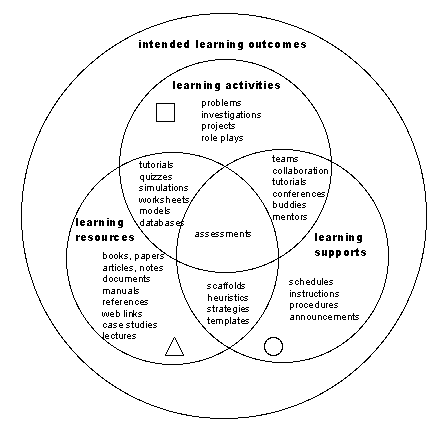
The use of ICT’s can serve as the resources and support mechanisms used to enhance students learning experiences with tasks. These experiences are what drive students engagement in the course content and promote the outcome of learning (1).
For me, I see the use of ICT’s as critical to my learning experience. As a distance education student, the role of the internet and ICT’s is vital to my ability to communicate, source appropriate data, and complete my degree successfully. The e-learning tools/methodologies provide me with a better concept of how I learn best and the tools available to me in terms of achieving my educational goals. Likewise, teachers can use these methodologies of a way of determining how to engage their students and construct programs that allow them to effectively target meaning and purpose to individual students. With the utilities available through ICT’s anything is possible.
References
1)http://www.learningdesigns.uow.edu.au/project/learn_design.htm
REFLECTIONS
How important are ICT's in the construction of learning designs in the information age?
Learning designs refer to a variety of ways of designing student learning experiences, that is, a sequence of types of activities and interactions. It is argued that a learning design comprises the following key elements:
• Tasks that learners are required to do.
• Resources that support learners to conduct the task.
• Support mechanisms that exist from a teacher implementing it.
(1)
The use of ICT’s can serve as the resources and support mechanisms used to enhance students learning experiences with tasks. These experiences are what drive students engagement in the course content and promote the outcome of learning (1).
For me, I see the use of ICT’s as critical to my learning experience. As a distance education student, the role of the internet and ICT’s is vital to my ability to communicate, source appropriate data, and complete my degree successfully. The e-learning tools/methodologies provide me with a better concept of how I learn best and the tools available to me in terms of achieving my educational goals. Likewise, teachers can use these methodologies of a way of determining how to engage their students and construct programs that allow them to effectively target meaning and purpose to individual students. With the utilities available through ICT’s anything is possible.
References
1)http://www.learningdesigns.uow.edu.au/project/learn_design.htm
REFLECTIONS
How important are ICT's in the construction of learning designs in the information age?
Welcome to my Blog
Hi all
There is little doubt that Information Communication Technologies (ICT) have become an increasingly important aspect of modern day society. Their uses are vast but probably their greatest service is their utility in educational and learning contexts.
In the field of formal education, ICTs are increasingly deployed as tools to extend the learner’s capacity to perceive, understand and communicate. Through the internet students are able to take advantage of a far greater scope of information than ever before. Furthermore, students can use the internet and its various functions to tailor a learning experience suited to their preferred learning style.
As I discover more about the benefits and implications of e-learning tools through my involvement in the CQUniversity course, Managing E-Learning (FAHE 11001), I invite you to follow me along in my e-learning journey.
Regards
Lyneale
There is little doubt that Information Communication Technologies (ICT) have become an increasingly important aspect of modern day society. Their uses are vast but probably their greatest service is their utility in educational and learning contexts.
In the field of formal education, ICTs are increasingly deployed as tools to extend the learner’s capacity to perceive, understand and communicate. Through the internet students are able to take advantage of a far greater scope of information than ever before. Furthermore, students can use the internet and its various functions to tailor a learning experience suited to their preferred learning style.
As I discover more about the benefits and implications of e-learning tools through my involvement in the CQUniversity course, Managing E-Learning (FAHE 11001), I invite you to follow me along in my e-learning journey.
Regards
Lyneale
Subscribe to:
Comments (Atom)
